MySQL Joins Explained: INNER JOIN vs LEFT JOIN vs RIGHT JOIN vs CROSS JOIN
When working with relational databases, data is usually stored across multiple tables rather than in a single large table. This design reduces redundancy and improves data organization. However, to retrieve meaningful information, you often need to combine data from multiple tables.
This is where MySQL JOINs come into play.
Whether you're building an e-commerce website, an employee management system, or a blogging platform, JOINs are one of the most frequently used SQL concepts. Understanding how they work is essential for writing efficient and scalable database queries.
In this guide, we'll explore every major type of MySQL JOIN with practical examples and best practices.
What Is a JOIN in MySQL?
A JOIN is used to combine rows from two or more tables based on a related column.
Instead of storing duplicate information in every table, databases maintain relationships using primary and foreign keys. JOINs help retrieve related information from these tables in a single query.
For example:
-
A Users table stores customer information.
-
An Orders table stores order details.
-
Both tables are connected using the
user_idcolumn.
Using a JOIN, you can retrieve customer names along with their orders.
Why Do We Need JOINs?
Without JOINs, developers often need to execute multiple queries and manually combine the data inside the application.
For example:
-
Retrieve all users.
-
Retrieve all orders.
-
Match users with their orders in application code.
This approach increases database calls and reduces performance.
A JOIN allows MySQL to combine the data efficiently in a single query.
Benefits include:
-
Faster queries
-
Cleaner SQL
-
Reduced application logic
-
Better performance
-
Easier maintenance
Sample Database
We'll use the following tables throughout this guide.
Users Table
| id | name | city |
|---|---|---|
| 1 | John | London |
| 2 | Alice | Paris |
| 3 | Bob | Berlin |
| 4 | Emma | Rome |
Orders Table
| id | user_id | product | amount |
|---|---|---|---|
| 1 | 1 | Laptop | 1200 |
| 2 | 1 | Mouse | 50 |
| 3 | 2 | Keyboard | 100 |
| 4 | 5 | Monitor | 300 |
Notice that the last order belongs to user_id = 5, which doesn't exist in the Users table.
INNER JOIN
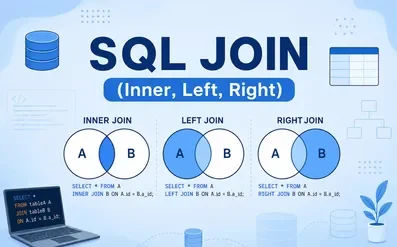
An INNER JOIN returns only the rows that have matching values in both tables.
Syntax
SELECT columns
FROM table1
INNER JOIN table2
ON table1.column = table2.column;
Example
SELECT
users.name,
orders.product,
orders.amount
FROM users
INNER JOIN orders
ON users.id = orders.user_id;
Result
| Name | Product | Amount |
|---|---|---|
| John | Laptop | 1200 |
| John | Mouse | 50 |
| Alice | Keyboard | 100 |
The order with user_id = 5 is ignored because there is no matching user.
When to Use INNER JOIN
Use an INNER JOIN when you only need records that exist in both tables.
Examples:
-
Customers with orders
-
Students enrolled in courses
-
Employees assigned to departments
LEFT JOIN
A LEFT JOIN returns all rows from the left table and matching rows from the right table.
If no match exists, MySQL returns NULL for the right table.
Syntax
SELECT columns
FROM users
LEFT JOIN orders
ON users.id = orders.user_id;
Result
| Name | Product |
|---|---|
| John | Laptop |
| John | Mouse |
| Alice | Keyboard |
| Bob | NULL |
| Emma | NULL |
Bob and Emma appear even though they haven't placed any orders.
When to Use LEFT JOIN
LEFT JOIN is useful when you need:
-
All users
-
All employees
-
All products
-
All categories
...including those without related records.
RIGHT JOIN
A RIGHT JOIN returns every row from the right table and matching rows from the left table.
If no match exists, columns from the left table become NULL.
Example
SELECT
users.name,
orders.product
FROM users
RIGHT JOIN orders
ON users.id = orders.user_id;
Result
| Name | Product |
|---|---|
| John | Laptop |
| John | Mouse |
| Alice | Keyboard |
| NULL | Monitor |
The Monitor order appears because it exists in the Orders table even though no matching user exists.
When to Use RIGHT JOIN
RIGHT JOIN is less common because you can usually achieve the same result using a LEFT JOIN by swapping the table order.
CROSS JOIN
A CROSS JOIN returns every possible combination of rows from both tables.
Example
If:
Users = 4 rows
Departments = 3 rows
The result contains:
4 × 3 = 12 rows
Syntax
SELECT
users.name,
departments.department_name
FROM users
CROSS JOIN departments;
When to Use CROSS JOIN
Useful for:
-
Product combinations
-
Calendar generation
-
Test data generation
-
Matrix reports
Avoid using CROSS JOIN on large tables because it can generate millions of rows.
SELF JOIN
A SELF JOIN joins a table with itself.
Suppose an Employees table contains:
| id | name | manager_id |
|---|---|---|
| 1 | John | NULL |
| 2 | Alice | 1 |
| 3 | Bob | 1 |
| 4 | Emma | 2 |
Query:
SELECT
e.name AS Employee,
m.name AS Manager
FROM employees e
LEFT JOIN employees m
ON e.manager_id = m.id;
Result
| Employee | Manager |
|---|---|
| John | NULL |
| Alice | John |
| Bob | John |
| Emma | Alice |
Common Use Cases
-
Employee hierarchy
-
Category hierarchy
-
Family trees
-
Organizational structures
JOIN vs Multiple Queries
Suppose you need customer names and order details.
Instead of:
Query 1 → Users

Query 2 → Orders

Combine manually
Use:
SELECT
users.name,
orders.product
FROM users
INNER JOIN orders
ON users.id = orders.user_id;
Advantages:
-
One database call
-
Less application code
-
Better performance
-
Easier maintenance
JOIN Performance Tips
JOINs can become slow if not optimized properly.
Index JOIN Columns
Always create indexes on columns used in JOIN conditions.
Example:
CREATE INDEX idx_user_id
ON orders(user_id);
Select Only Required Columns
Instead of:
SELECT *
Use:
SELECT
users.name,
orders.product
Fetching fewer columns reduces memory usage and improves performance.
Avoid Joining Large Unnecessary Tables
Join only the tables required for your query.
Every additional JOIN increases processing time.
Use EXPLAIN
Always analyze your JOIN queries.
EXPLAIN
SELECT
users.name,
orders.product
FROM users
INNER JOIN orders
ON users.id = orders.user_id;
Check whether MySQL uses indexes instead of performing full table scans.
Common JOIN Mistakes
Forgetting the ON Clause
Incorrect:
SELECT *
FROM users
JOIN orders;
This creates a Cartesian product.
Always specify the relationship using ON.
Using SELECT *
Retrieving every column increases bandwidth and memory usage.
Instead, request only the columns your application needs.
Missing Indexes
Without indexes, JOINs often become very slow as tables grow.
Always index foreign key columns.
Choosing the Wrong JOIN
Using an INNER JOIN when you actually need a LEFT JOIN may unintentionally exclude important records.
Always choose the JOIN type based on your business requirement.
Real-World Examples
E-Commerce
-
Customers
-
Orders
-
Products
-
Payments
JOINs combine all related information into one report.
School Management System
Retrieve:
-
Student name
-
Course
-
Teacher
-
Grade
using multiple JOINs.
Employee Portal
Display:
-
Employee
-
Department
-
Manager
-
Office Location
using JOIN operations across different tables.
Best Practices
-
Normalize your database to reduce redundancy.
-
Use meaningful primary and foreign keys.
-
Index columns used in JOIN conditions.
-
Avoid unnecessary JOINs.
-
Retrieve only the columns you need.
-
Use
EXPLAINto analyze query execution. -
Test JOIN performance on large datasets.
-
Keep queries readable with table aliases.
Final Thoughts
JOINs are one of the most important concepts in MySQL and are used in almost every real-world application. Whether you're building a CRM, e-commerce platform, ERP, or blogging system, you'll frequently combine data from multiple related tables.
Understanding the differences between INNER JOIN, LEFT JOIN, RIGHT JOIN, CROSS JOIN, and SELF JOIN allows you to write cleaner, faster, and more maintainable SQL queries. Choosing the right JOIN type ensures your application retrieves exactly the data it needs while maintaining excellent performance.
As your database grows, remember to optimize your JOIN queries by indexing foreign keys, selecting only the necessary columns, and analyzing execution plans with EXPLAIN. Mastering JOINs is a crucial step toward becoming a proficient MySQL developer and building scalable database-driven applications.
