MySQL Indexing Explained: Speed Up Your Database Queries Like a Pro
Introduction
If you've ever noticed your application becoming slower as your database grows, you're not alone. A query that executes in milliseconds with a few thousand records can suddenly take several seconds once your table reaches millions of rows.
Fortunately, MySQL provides a powerful feature to solve this problem: Indexes.
Think of an index as the table of contents in a book. Instead of reading every page to find a chapter, you simply look at the index and jump directly to the information you need.
Let's explore how MySQL indexing works and how you can use it to build faster applications.
What Is a MySQL Index?
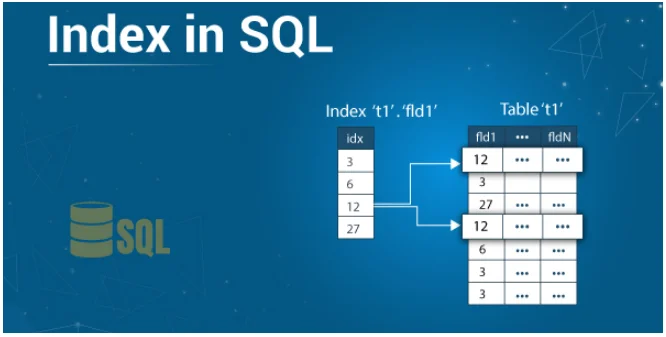
A MySQL index is a special data structure that allows the database engine to locate rows much faster without scanning the entire table.
Without an index, MySQL performs a Full Table Scan, checking every row until it finds the matching records.
With an index, MySQL can jump directly to the required rows.
For large databases, this difference can reduce query execution time from several seconds to just a few milliseconds.
Why Are Indexes Important?
Indexes offer several benefits:
-
Faster SELECT queries
-
Improved WHERE clause performance
-
Faster JOIN operations
-
Better ORDER BY sorting
-
Faster GROUP BY operations
-
Reduced database load
For applications with thousands or millions of records, indexes are essential.
Example Without an Index
Imagine a table containing one million users.
SELECT *
FROM users
WHERE email = 'john@example.com';
If the email column isn't indexed, MySQL checks every single row.
Execution plan:
1
2
3
4
...
999999
1000000
This process becomes slower as the table grows.
Adding an Index
CREATE INDEX idx_email
ON users(email);
Now MySQL can quickly locate the required record.
The same query becomes significantly faster.
Types of MySQL Indexes
1. Primary Index
Every table should have a primary key.
CREATE TABLE users (
    id INT PRIMARY KEY,
    name VARCHAR(100)
);
The primary key automatically creates a unique index.
2. Unique Index
Ensures duplicate values cannot exist.
CREATE UNIQUE INDEX idx_username
ON users(username);
Useful for:
-
Username
-
Email
-
Employee ID
-
Product SKU
3. Normal Index
The most common type.
CREATE INDEX idx_city
ON users(city);
Improves search performance without enforcing uniqueness.
4. Composite Index
Indexes multiple columns together.
CREATE INDEX idx_name_city
ON users(first_name, city);
This index helps queries like:
SELECT *
FROM users
WHERE first_name = 'John'
AND city = 'London';
Column order matters.
5. Full-Text Index
Useful for searching large text.
CREATE FULLTEXT INDEX idx_description
ON products(description);
Ideal for:
-
Blog search
-
Product search
-
Documentation
-
News websites
How MySQL Uses an Index
Suppose your table contains:
| ID | Name | City |
|---|---|---|
| 1 | Alice | London |
| 2 | Bob | Paris |
| 3 | John | London |
| 4 | Emma | Berlin |
If City has an index:
Berlin → Row 4

London → Rows 1,3

Paris → Row 2
Searching:
SELECT *
FROM users
WHERE city='London';
MySQL directly jumps to the indexed location.
Without an index, it checks every row.
Checking Whether MySQL Uses an Index
Use the EXPLAIN statement.
EXPLAIN
SELECT *
FROM users
WHERE email='john@example.com';
Important columns include:
-
type
-
key
-
rows
-
Extra
If the key column is NULL, no index is being used.
When Should You Create an Index?
Indexes are most beneficial for columns used in:
-
WHERE clauses
-
JOIN conditions
-
ORDER BY
-
GROUP BY
-
Foreign keys
-
Frequently searched columns
Examples include:
-
email
-
phone
-
username
-
company_id
-
product_id
-
created_at
When Should You Avoid Indexes?
Indexes are not always beneficial.
Avoid indexing columns that:
-
Have only a few unique values (such as gender or status)
-
Change frequently
-
Are rarely queried
Every additional index increases:
-
INSERT time
-
UPDATE time
-
DELETE time
-
Storage usage
Use indexes wisely.
Composite Index Rule
Suppose you have:
CREATE INDEX idx_user
ON users(first_name, last_name, city);
This index works for:
WHERE first_name='John'
WHERE first_name='John'
AND last_name='Doe'
WHERE first_name='John'
AND last_name='Doe'
AND city='London'
But it won't efficiently help:
WHERE last_name='Doe'
This is known as the Leftmost Prefix Rule.
Common Indexing Mistakes
Indexing Every Column
More indexes do not automatically mean better performance.
Ignoring EXPLAIN
Always verify whether MySQL is actually using your index.
Wrong Composite Index Order
The order of columns determines whether MySQL can use the index effectively.
Too Many Duplicate Values
Columns with very low uniqueness often provide little benefit.
Best Practices
-
Always create a primary key.
-
Index columns used frequently in searches.
-
Use composite indexes for common multi-column queries.
-
Remove unused indexes.
-
Analyze slow queries regularly.
-
Use
EXPLAINbefore optimizing. -
Monitor query performance over time.
Real-World Example
Imagine an e-commerce website with 5 million products.
Users frequently search by:
-
Category
-
Brand
-
Price
-
Availability
Instead of creating separate indexes, you might use:
CREATE INDEX idx_product_search
ON products(category_id, brand_id, price);
This significantly improves product listing pages and search filters.
Conclusion
MySQL indexing is one of the most impactful techniques for improving database performance. A well-designed indexing strategy can reduce query execution times from seconds to milliseconds, resulting in faster applications, happier users, and reduced server load.
However, indexes should be used strategically. Adding too many indexes can slow down write operations and consume unnecessary storage. The key is to understand your application's query patterns and create indexes that support them.
Whether you're building a small web application or managing a database with millions of records, mastering MySQL indexing is a skill that will pay dividends throughout your development career.
Start by analyzing your slow queries, use EXPLAIN to understand execution plans, and create indexes where they provide the greatest benefit. Your database—and your users—will thank you.
